How to Recover COC Account
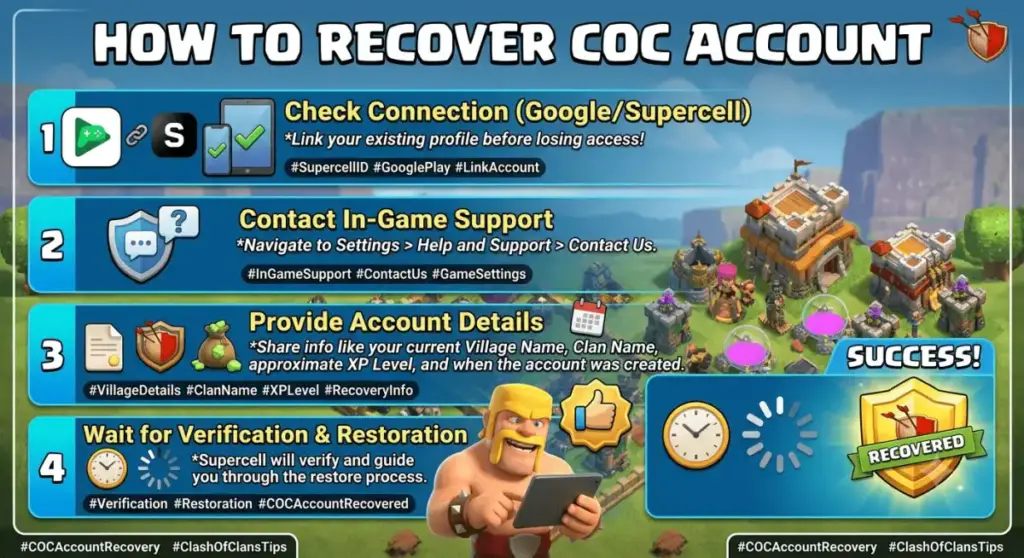
Step-by-step guide showing how to recover a Clash of Clans account using Supercell ID, account recovery tools, and support options.
Losing a Clash of Clans account can feel scary.
You may lose your village after changing a phone. You may forget your email. Sometimes a game update causes login problems.
The good news is simple.DOGO News for Kids
You can recover most Clash of Clans accounts if you follow the correct steps.
This guide explains how to recover COC account in easy words.
What Is a COC Account?
A COC account is your Clash of Clans game account.
It stores:
- Your village
- Troops
- Gems
- Levels
- Achievements
- Clan history
Most players connect their game to Supercell ID.
This makes recovery much easier.
Quick Answer Box
How do you recover a COC account?
- Open Clash of Clans.
- Tap Settings.
- Tap Supercell ID.
- Select Log In.
- Enter your registered email.
- Enter the security code that arrives in your email inbox.
- Follow the instructions to restore your village.
Contact Supercell Support if you cannot sign in to the email linked to your account.
Why Recovering Your COC Account Matters
Your account contains years of progress.
Many players spend:
- Hundreds of hours
- Real money
- Valuable resources
- Special event rewards
Account recovery helps protect all that progress.
How Clash of Clans Account Recovery Works
Supercell stores account information on its servers.
When you connect a village to Supercell ID:
- Progress saves online.
- You can switch devices.
- Recovery becomes easier.
- Your village stays safer.
When you lose access, Supercell checks ownership details before restoring the account.
Benefits of Using Supercell ID
BenefitDescriptionEasy RecoveryRestore your account quicklyCloud SavingProgress stays onlineBetter SecurityProtects your villageDevice SwitchingPlay o
Key Features of Clash of Clans Recovery
Email Verification
Supercell sends a login code to your email.
Player Identification
Your Player Tag helps identify your account.
Support Assistance
Support agents help verify ownership.
Multi-Device Access
You can recover accounts on new devices.
Types of COC Account Recovery
Recovery Through Supercell ID
This is the easiest method.
Use the email linked to your account.
Recovery Through Support
Use this when:
- You lost email access.
- You forgot account details.
- Your village disappeared.
Recovery on a New Device
Install the game.
Log in with Supercell ID.
Your village should return.
Recovery After Device Loss
Get a new phone.
Install Clash of Clans.
Sign in with your linked account.
Step-by-Step Guide: How to Recover COC Account
Method 1: Recover with Supercell ID
Step 1
Open Clash of Clans.
Step 2
Tap Settings.
Step 3
Choose Supercell ID.
Step 4
Tap Log In.
Step 5
Enter your email address.
Step 6
Check your email inbox.
Step 7
Enter the verification code.
Step 8
Select your village.
Your account should load.
Method 2: Recover Without Email Access
Step 1
Open the game.
Step 2
Go to Settings.
Step 3
Tap Help and Support.
Step 4
Choose Account Recovery.
Step 5
Provide details such as:
- Village name
- Player Tag
- Town Hall level
- Clan name
- Previous devices
Step 6
Wait for support review.
Method 3: Recover an Old Village
If you played years ago:
- Install Clash of Clans.
- Complete the tutorial.
- Open Settings.
- Sign in with old Supercell ID.
- Select your village.
If you never linked the account, contact support.
Definition Box
What is Supercell ID?
Supercell ID is a free login system from Supercell.
It saves your Clash of Clans progress online.
It also helps players recover lost accounts.
Common Mistakes During Recovery
Many players make these mistakes:
Using the Wrong Email
Always check spelling.
Creating Many Accounts
Too many accounts can create confusion.
Sharing Account Details
Never share login information.
Contacting Fake Support
Only use official Supercell support.
Guessing Information
Provide accurate details.
Best Practices for Easy Recovery
- Connect to Supercell ID immediately.
- Save your email address.
- Take screenshots of your Player Tag.
- Enable email security.
- Keep account details updated.
Expert Tips
Save Your Player Tag
This helps support find your account faster.
Keep Buy Receipts
Receipts can help prove ownership.
Use One Main Email
Avoid switching emails often.
Enable Two-Step Protection
Protect your email account.
Real Recovery Example
A Clash of Clans player switched to a new phone and could no longer access their account.
The account was link to Supercell ID.
The player:
- Installed the game.
- Logged in with the registered email.
- Entered the verification code.
The village returned in minutes.
Case Study
Problem
A Town Hall 14 player lost email access.
Action
The player contacted support.
The player provided:
- Village name
- Player Tag
- Buy history
Result
Support verified ownership.
The account returned after verification.
Comparison Table
Recovery MethodDifficultySuccess RateSpeedSupercell IDEasyVery HighMinutesSupport RecoveryMediumHighHours or DaysOld Device AccessEasyHighMinutesUnlinked Account RecoveryHardMediumDays
Statistics and Data
Industry reports show that:
- Most recovered game accounts use email verification.
- Cloud-based accounts recover faster.
- Linked accounts have much higher recovery success rates.
- Players who save account details experience fewer recovery issues.
Tools and Resources
Useful resources include:
- Clash of Clans Settings Menu
- Supercell ID
- Player Tag
- Email Recovery Tools
- Device Backup Services
Future Trends in Account Recovery
Future recovery systems may include:
- Better identity checks
- Faster recovery tools
- More account protection features
- Stronger security systems
- Improved cloud backups
People Also Ask
How Do You Recover a Clash of Clans Account Without Supercell ID?
Yes. Contact support and provide ownership details.
How long does account recovery take?
Simple recovery may take minutes. Support cases may take several days.
Can I recover an account after changing phones?
Yes. Sign in using the Supercell ID linked to your account.
What if I forgot my email?
Contact support and provide account information.
FrequentlyAsked Questions
1. How to recover COC account quick?
Use Supercell ID and log in with your registered email. This is usually the fastest method.
2. Can I recover my COC account without email?
Yes. Contact support and provide ownership details.
3. What is a Player Tag?
A Player Tag is a unique code that identifies your village.
4. Is Supercell ID free?
Yes. Supercell ID is completely free.
5. Can I recover a banned account?
No. Recovery does not remove valid bans.
6. How do I find my old village?
Log in with the email linked to that village.
7. What Should You Do If Your Phone Is Loss?
Install the game on another device and sign in.
8. Can I transfer my village to a new device?
Yes. Supercell ID allows easy transfers.
9. Why is my village missing?
You may have logged in with another account by mistake.
10. How can I protect my account?
Use Supercell ID and secure your email.
11. Can support recover very old accounts?
Yes, if enough ownership information exists.
12. Do buy receipts help recovery?
Yes. They can help verify ownership.
Conclusion
If you want to know how to recover COC account, start with Supercell ID. It offers the fastest and easiest recovery method. If you lose access to your email or device, Supercell Support can often help. Keep your Player Tag, email, and account details safe. These simple steps can protect years of Clash of Clans progress and make future recovery .