How Do I Reset the Change Oil Light? Easy Step-by-Step Guide
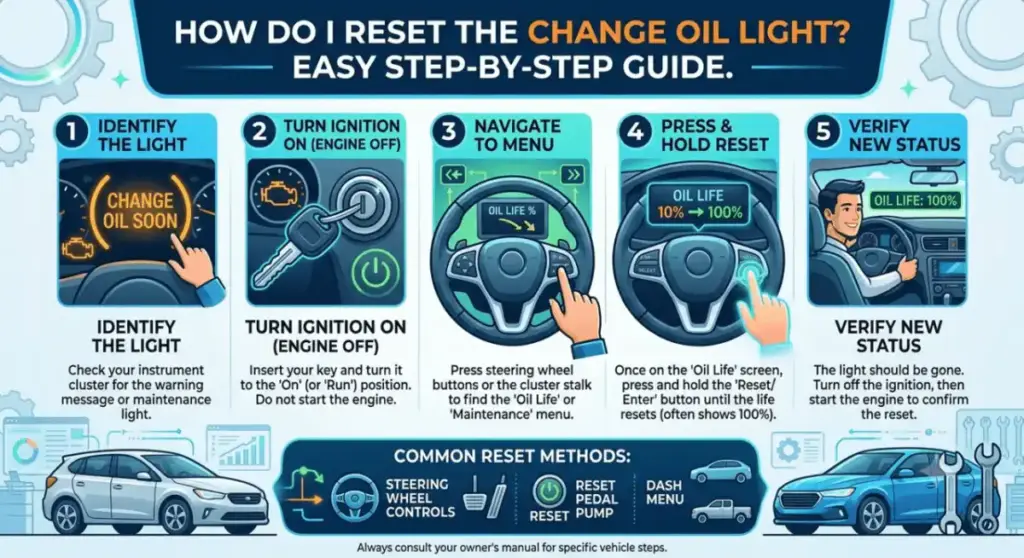
A modern car dashboard showing the oil life reset option after an engine oil change.
You just changed your oil. Or maybe the shop did it for you. Either way, that little wrench icon is still glowing on your dash like it forgot the memo.
Good news: it’s not broken. It just needs to be told the oil is new. You do that yourself, and it takes less time than your last oil change did.Filimin App
The Short Version
Turn your key to the ON position, but don’t start the engine. Find the oil life or maintenance menu on your dash or touchscreen. Hit reset. Hold it if your car asks you to. The number should climb to 100%, and the light should go dark.
That’s the whole idea. The tricky part is that every automaker hides this menu somewhere different. We’ll walk through the common ones below.
What That Light Actually Means
The oil change light isn’t a damage alert. It’s more like a nudge from your car’s computer, reminding you it’s time for fresh oil.
Your vehicle doesn’t have a sensor sitting in the oil pan checking quality in real time. Instead, it tracks things like how far you’ve driven, how hot the engine runs, and how you drive day to day. From that, it guesses how much life your oil has left.
Once you actually change the oil, that guess needs to reset back to zero. The car has no way of knowing you did the work unless you tell it.
Why Bother Resetting It
You could just ignore the light and drive around with it lit up forever. Plenty of people do. But that defeats the whole point of having it.
Here’s what resetting actually gets you:
- An accurate countdown to your next oil change
- No more annoying dashboard warning every time you start the car
- A maintenance history that actually means something
- Peace of mind that your engine’s getting looked after on schedule
One thing worth saying twice: don’t reset the light until the oil is actually changed. If you reset it first and forget to follow through, you’ve got old oil in the engine and a dashboard that thinks everything’s fine.
How Your Car Figures Out Oil Life
A lot of drivers assume there’s a tiny sensor dipped in the oil, constantly checking its condition. That’s not usually how it works.
Most cars run calculations instead, based on things like:
- Engine temperature over time
- Total miles driven
- How much stop-and-go traffic you deal with
- Trip length (short trips wear oil out faster than long highway drives)
- Engine RPM patterns
- Heavy towing or hauling
- Extreme hot or cold weather
The computer crunches all of that and spits out a percentage. When it drops low enough, the light comes on.
Where the Reset Button Actually Lives
Depending on your car’s age and trim level, you’ll find the reset option in one of four places.
On the Dash Itself
Older cars, and some budget models, use a physical button. You usually hold it down with the ignition on, and the oil life counter cycles down until it hits zero, then starts over at 100.
On the Steering Wheel
Newer cars often route you through the steering wheel controls. You’ll scroll into a settings or vehicle info menu and look for something labeled Oil Life or Maintenance.
On the Touchscreen
If your car has an infotainment screen, check under Vehicle Settings or Maintenance. The reset option is usually just a tap away, sometimes with a confirmation screen after.
Through a Scan Tool
Luxury brands and a handful of others require a diagnostic tool to clear the reminder. This is one of the few times you’ll actually need a shop, or at least a cheap OBD-II reader.
Step-by-Step: Doing It Yourself
Here’s the process from start to finish.
1. Park somewhere flat and shut the engine off. Basic, but skip it and you’ll fight the dash menus while the car’s still running.
2. Actually change the oil first. Drain the old stuff, swap the filter if it’s due, and fill with the oil your manual recommends. Resetting the light doesn’t mean anything if the oil underneath is still old.
3. Turn the key or push-button start to ON, engine off. For push-button cars, press the start button once without touching the brake pedal. That gets your electronics running without firing up the engine.
4. Dig into the maintenance menu. Look for words like Oil Life, Service, Vehicle Info, or just Maintenance. It’s usually buried a menu or two deep.
5. Select Reset. Some cars want you to confirm, others want you to hold the button for a few seconds. Follow whatever prompt shows up.
6. Check the number. You’re looking for 100% oil life and a dashboard light that’s actually gone.
7. Start the car and double check. Fire up the engine and make sure nothing pops back up. If the light’s still there, run through the steps again, or pull out your owner’s manual.
Reset Steps by Brand
Every manufacturer does this a little differently. Here’s a quick rundown for the most common ones.
Toyota — Key to ON, then dig into the settings menu for the maintenance reset option and confirm it.
Honda — Use the steering wheel buttons to open the maintenance menu, tap into Oil Life, then Reset.
Ford — Head to Settings, then Vehicle, then Oil Life Reset. Hold OK until the number hits 100%.
Chevrolet — Pull up the driver information center, find Oil Life, and press Reset.
Nissan — Open the maintenance screen on the dash display, choose Oil and Filter, and reset it from there.
Model years shift things around more than you’d expect, so if none of this matches your dash, your owner’s manual will have the exact button sequence.
Mistakes That Trip People Up
- Resetting the light before the oil’s actually been changed
- Grabbing the wrong oil weight or grade for your engine
- Skipping the filter swap to save a few bucks
- Turning the engine fully on instead of just switching to accessory or ignition mode
- Topping off with too little oil and driving off anyway
- Ignoring the light for months because “the car still runs fine”
None of these will kill your engine overnight. But stack them up over a year or two, and you’ll notice the difference in how the car runs.
Good Habits Worth Building
Stick to your car’s recommended oil change interval instead of guessing. Use the oil grade listed in your manual, not whatever’s cheapest at the store. Check the level with the dipstick a day or two after any oil change, just to be safe. Swap the filter every time, not every other time. And jot down the date and mileage somewhere you’ll actually see it again.
None of this takes long, but it adds up to an engine that lasts a lot longer.
When the Light Won’t Go Away
If you’ve reset it and the warning’s still glowing, a couple of things could be going on. The reset sequence might not have completed properly, so try it again slowly this time. Or there’s a chance the sensor or dash system has its own glitch that needs a scan tool to sort out.
If the light comes back within a day or two of a fresh reset, don’t brush it off. Check for oil leaks under the car, and if nothing’s obvious, get it looked at.
Quick Questions People Ask
Can I reset the light before I actually change the oil? You can, technically, but don’t. It just makes it easier to forget the oil’s still old.
Why won’t the light turn off after I reset it? The reset probably didn’t finish. Go through the steps again, slower this time, and check your manual for the exact sequence your car wants.
Is the reset process the same on every car? No. Even different trims of the same model sometimes use different menus.
Can I still drive with the light on? For a short distance, usually yes, as long as it’s just the oil reminder. If you see a separate oil pressure warning too, pull over and don’t keep driving.
How often should I actually be changing the oil? Whatever your manual says, since that number accounts for your specific engine and oil type. Most modern cars land somewhere between 5,000 and 10,000 miles, but yours might be different.
The Bottom Line
Resetting the oil change light isn’t complicated once you know where your car hides the menu. Change the oil, find the reset option, confirm it, and check that the number reads 100%.
Do it every time you change the oil, and your dashboard stays honest with you about what your engine actually needs.